
As Amazon Associates, we earn from qualifying purchases. This means we may receive a small commission at no extra cost to you if you click through and make a purchase.
Finding the right peripheral requires balancing physical output speed, imaging clarity, and studio space when shopping for an hp printer all in one wireless configuration. Creators, home studio operators, and remote professionals constantly weigh the trade-offs between a compact physical footprint and extended supply life. A versatile hp printer scanner copier all in one wireless machine centralizes document intake, physical artwork digitization, shipping labels, and proofs without requiring separate hardware for every task. The key is matching print speed, imaging mechanisms, and tray capacity to your real-world production demands.
HP organizes its multifunction printer catalog into three distinct hardware families tailored to different workloads. The entry-level DeskJet series handles everyday domestic routines using traditional cartridges supported by optional Instant Ink subscriptions. The Smart Tank series replaces cartridges with high-capacity refillable reservoirs containing years of bundled ink, catering to creators who output frequent color drafts. For high-volume business velocity, the LaserJet Pro MFP line uses electrophotographic toner, automatic duplexing, robust security, and deep paper cassettes. Understanding this split streamlines an hp all in one printer comparison when determining which hp all in one printer to buy.
This guide by the numbers
4.9/5
Best rated model
Highest buyer average in this line-up, as left by Amazon shoppers
6
Models on file
Models in this guide that have a stored product record
1
Brand involved
Distinct brand names on the product records used here
Figures come from the stored Amazon listing data for the products in this article. Ratings are buyer averages, not scores given by this site.
HP All-in-One Printers Lineup at a Glance
| Model | Print Engine | Document Feeder | Output & Capacity |
|---|---|---|---|
| HP DeskJet 2955 | Thermal Inkjet (Color) | Flatbed only | 7.5 ppm black, 5.5 ppm color, 60-sheet tray |
| HP Smart Tank 5003 | Thermal Inkjet (Refillable Tank) | Flatbed only | 10 ppm copy speed, 6,000 pages ink included |
| HP Color LaserJet Pro MFP 3301sdw | Laser (TerraJet Color) | Auto Document Feeder | 26 ppm black/color, 250-sheet tray, auto-duplex |
| HP DeskJet 4355 | Inkjet (Color) | 35-sheet ADF | 8.5 ppm black, 5.5 ppm color, 60-sheet tray |
| HP Smart Tank 7603 | Thermal Inkjet (Refillable Tank) | 35-sheet ADF | 15 ppm black, auto two-sided, fax |
| HP LaserJet Pro MFP 3101fdw | Laser (Monochrome) | Auto Document Feeder | 35 ppm black, auto-duplex, fax, 5000 copy run |
The Models in Detail
01
HP DeskJet 2955 Wireless All-in-One Color
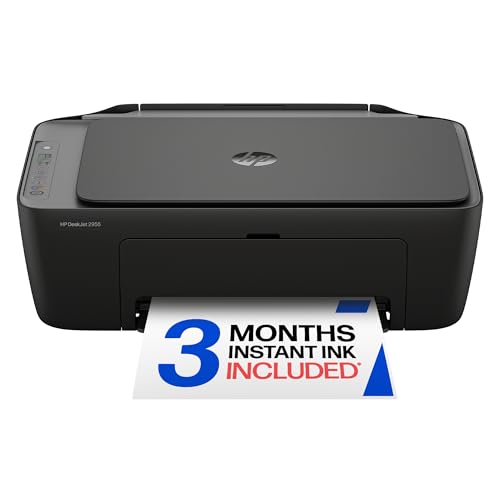
HP DeskJet 2955 Wireless All-in-One Color
Best for: Occasional home printing in compact spaces
Pros
- Dual-band Wi-Fi
- Lightweight 7.6-pound frame
- AI formatting optimization
Cons
- 60-sheet input tray
- Limited 9-copy run ceiling
The HP DeskJet 2955 Wireless All-in-One Color serves as an ultra-compact peripheral engineered for essential household documents, recipes, and personal checklists. Weighing 7.6 pounds and measuring 11.97 inches deep by 16.73 inches wide by 6.06 inches high, it slides easily onto compact desks or studio shelving. The thermal inkjet system outputs up to 7.5 pages per minute in black and 5.5 pages per minute in color, drawing from a 60-sheet rear paper tray. A flatbed scanner manages digitizing and black-and-white copies at speeds up to 6 pages per minute, with a run limit of 9 copies.
Connectivity relies on dual-band Wi-Fi engineered to detect and resolve network disruptions automatically, alongside mobile printing via the HP App for laptops, desktop computers, and smartphones. The top surface integrates an Icon LCD display for operational feedback. HP includes AI formatting tools that optimize web pages and emails by removing unwanted layout artifacts before printing. The unit includes a 3-month trial of HP Instant Ink, which ships replacement ink cartridges automatically before supplies deplete.
This model suits casual home users and hobbyists producing intermittent single-page documents and shipping labels. However, its 60-sheet capacity and 9-copy run limit mean users managing multi-page documents or continuous print volumes will quickly outgrow its hardware, making the step up to a high-capacity tank or an ADF-equipped unit necessary.
02
HP Smart Tank 5003 Wireless All-in-One
Best for: Busy home studios requiring bulk ink duplexing
Pros
- Up to 8,000 color pages included
- Automatic two-sided printing
- 35-sheet ADF with fax
Cons
- 17-pound footprint
- Heavier than standard DeskJets

HP Smart Tank 5003 Wireless All-in-One
Best for: High-volume color printing with low maintenance
Pros
- Up to 6,000 pages ink included
- Mess-free refill system
- Borderless photo printing
Cons
- Flatbed scanner lacks ADF
- No automatic duplexing
The HP Smart Tank 5003 Wireless All-in-One transitions the thermal inkjet architecture to high-capacity refillable tanks, eliminating conventional cartridge replacements. The box includes up to three years of Original HP Ink, providing up to 6,000 black or color pages right away. Refilling uses clean gravity-draining bottles that plug into dedicated color reservoirs without manual squeezing. Weighing 11.1 pounds and measuring 14.23 by 17.11 by 6.19 inches, it maintains a modest footprint while supporting plain paper, envelopes, and glossy photo paper for borderless printing.
Scanning is handled by a flatbed platen that supports scan-to-PDF workflows, paired with a copying engine that duplicates black-and-white documents at up to 10 pages per minute for up to 99 consecutive copies. The listing notes integrated AI workflow adaptability, mobile control via the HP App, and dual-band wireless networking. Hardware reliability is covered by a one-year or 30,000-page limited warranty, whichever comes first.
Creators, teachers, and small workshops generating ongoing color proofs, art prints, and administrative logs will benefit from the low running friction of this refillable tank. However, because scanning is limited strictly to manual single-sheet flatbed positioning, professionals handling thick contracts or multi-page documentation will be better served by the ADF-equipped Smart Tank 7603.
03
HP Color LaserJet Pro MFP 3301sdw

HP Color LaserJet Pro MFP 3301sdw
Best for: High-speed color office and agency workflows
Pros
- Fast 26 ppm print and copy speed
- Automatic duplexing and ADF
- 250-sheet input tray
Cons
- Heavy 37.7-pound chassis
- Restricted to original HP chip toner
The HP Color LaserJet Pro MFP 3301sdw delivers rapid electrophotographic throughput for small production teams and collaborative studios. Using next-generation TerraJet toner cartridges (Original HP 218A standard or 218X high yield), this color laser printer hp reaches print and copy speeds up to 26 pages per minute in both black and color. At 37.7 pounds and measuring 16.46 inches deep by 13.44 inches wide by 16.5 inches high, this heavy-duty unit is built for intensive business workloads.
Productivity features include an automatic document feeder for hands-free scanning, automatic two-sided printing, and a deep 250-sheet input paper cassette that minimizes reloading interruptions. Connectivity includes dual-band Wi-Fi, Ethernet, and smartphone app support, secured by HP Wolf Pro security protocols. The printer uses dynamic security measures that restrict toner supplies to cartridges with genuine HP chips or circuitry, maintained via periodic firmware updates.
This multifunction unit is designed for commercial studios, agencies, and offices producing double-sided client decks, color flyers, and administrative records. Casual creators seeking borderless photo printing or compact desk placement will find this enterprise laser machine overly bulky compared to HP’s desktop inkjet alternatives.
04
HP DeskJet 4355 Wireless All-in-One Color

HP DeskJet 4355 Wireless All-in-One Color
Best for: Multi-page document scanning for home offices
Pros
- 35-sheet automatic document feeder
- Ultralight 6-pound body
- 2-year warranty included
Cons
- 60-sheet input paper tray
- Modest 8.5 ppm monochrome speed
The HP DeskJet 4355 Wireless All-in-One Color enhances entry-level inkjet convenience by integrating a 35-sheet automatic document feeder. Weighing just 6 pounds with dimensions of 16.85 inches deep, 7.87 inches wide, and 13.07 inches high, it occupies minimal surface area on studio workbenches. The internal print engine delivers speeds up to 8.5 pages per minute in black and 5.5 pages per minute in color, with black-and-white copy speeds reaching 8 pages per minute from a 60-sheet input tray.
Navigated via an Icon LCD panel, the unit includes dual-band Wi-Fi with automatic reconnection features, single-processor task handling, and an included 2-year warranty. Built-in AI formatting helps remove extraneous email banners and web formatting before printing. A 3-month trial of HP Instant Ink is included, enabling automated cartridge delivery before ink levels run dry, while the HP App coordinates mobile printing and scanning.
This model is an excellent match for home offices and freelance creators who frequently digitize multi-page tax forms, agreements, and invoices without needing a massive enterprise footprint. However, those producing continuous runs of multi-page packets will find the 60-sheet paper tray restrictive, pointing them toward HP’s larger capacity tank or laser lines.
05
HP Smart Tank 7603 Wireless All-in-One
The HP Smart Tank 7603 Wireless All-in-One combines commercial multi-sheet document handling with high-capacity bulk ink reservoirs. Outfitted in an OOV White and Portobello finish, the 17-pound unit measures 14.33 inches deep, 16.83 inches wide, and 9.46 inches high. It includes up to three years of Original HP Ink in the box, delivering up to 8,000 color pages or 6,000 black pages. Thermal inkjet speeds reach up to 15 pages per minute in monochrome, supported by automatic two-sided printing and borderless output.
The machine integrates a 35-sheet automatic document feeder, flatbed platen, standalone faxing, and direct scan-to-PDF functionality. Users manage operations through a Magic Touch control panel that illuminates relevant keys during active workflows. Wireless networking spans 802.11a/b/g/n/ac Wi-Fi bands, accompanied by the HP App and gravity-feed spill-free bottle replenishment.
Studio owners and creative businesses producing rich marketing materials, borderless prints, and continuous administrative packets will find this model exceptionally capable. If your workflow does not require color imagery and demands output speeds exceeding 30 pages per minute, shifting to a high-speed monochrome laser is the more logical choice.
06
HP LaserJet Pro MFP 3101fdw Wireless
Best for: High-speed black-and-white office documentation
Pros
- Rapid 35 ppm monochrome output
- Up to 5,000 copies per run
- HP Wolf Pro Security
Cons
- Monochrome only without color printing
- Substantial 10.5 kg weight
The HP LaserJet Pro MFP 3101fdw Wireless is built for demanding black-and-white administrative production, scanning, copying, and faxing across workteams of up to seven users. Its monochrome laser engine prints at speeds up to 35 pages per minute single-sided, matched by a 35 page-per-minute copy speed and a high run allowance of up to 5,000 copies. Weighed at 10.5 kg (around 23.1 pounds) with dimensions of 16.5 by 12.3 by 15.7 inches, it handles plain paper, labels, glossy film, and photo stocks.
A built-in automatic document feeder and automatic two-sided printing accelerate double-sided record intake. Network connectivity includes intelligent self-healing Wi-Fi, Ethernet, Bluetooth, and mobile print protocols covering AirPrint, Android, and Chromebook platforms. Enterprise-grade HP Wolf Pro Security protects sensitive data, while dynamic security firmware enforces the use of cartridges with genuine HP chips.
This multifunction laser suits production studios, administrative hubs, and small businesses requiring rapid monochrome paperwork, invoices, and legal packets. Creators requiring full-color artwork rendering or vibrant proofs should consider the Color LaserJet 3301sdw or Smart Tank series instead.
Matching a Model to Your Setup
- Compact Studio Workstations: The HP DeskJet 2955 Wireless All-in-One Color fits minimal desk footprints at 7.6 pounds, managing everyday basic color prints and occasional single-sheet flatbed scanning.
- Frequent Color Proofers and Artists: The HP Smart Tank 5003 Wireless All-in-One provides borderless photo printing and up to 6,000 pages of ink out of the box for high-volume creative drafts without cartridge changes.
- Home Offices Processing Multi-Page Forms: The HP DeskJet 4355 Wireless All-in-One Color supplies a 35-sheet automatic document feeder on a lightweight 6-pound frame, simplifying multi-sheet scanning.
- Collaborative Agencies Requiring Fast Color Collateral: The HP Color LaserJet Pro MFP 3301sdw delivers rapid 26-page-per-minute color laser output, a 250-sheet paper tray, auto-duplexing, and ADF scanning.
- Hybrid Workspaces Demanding Bulk Ink and Automation: The HP Smart Tank 7603 Wireless All-in-One offers automatic two-sided printing, a 35-sheet ADF, fax capabilities, and up to 8,000 color pages of bundled reservoir ink.
- High-Speed Monochrome Production Hubs: The HP LaserJet Pro MFP 3101fdw Wireless outputs crisp black-and-white documents at 35 pages per minute with a 5,000-copy run ceiling and Wolf Pro network defense.
Before You Buy
Before purchasing an hp wireless multifunction printer, check the included physical accessories and connection cables. While the listings detail dual-band Wi-Fi, mobile app integration, and Ethernet capabilities on select office units, they do not specify whether a standard USB A-to-B data cable is included in the retail packaging. Studios operating in environments without reliable wireless networks or those preferring a direct tethered connection should secure an appropriate USB printer cable beforehand to ensure immediate operation.
Additionally, certain specifications such as maximum monthly duty cycles, exact input tray sheet capacities for the Smart Tank units, and optical scanner resolution DPI are omitted from the listings. Buyers should also note that the LaserJet models utilize dynamic security firmware engineered to reject toner cartridges that lack genuine HP chips or circuitry, with ongoing firmware updates maintaining these restrictions over the life of the machine.
FAQ
How does an hp smart tank vs deskjet comparison impact workflow?
The distinction centers on ink architecture and consumable longevity. DeskJet printers use traditional snap-in cartridges holding modest ink volumes, supported by optional HP Instant Ink delivery. Smart Tank printers feature large refillable internal reservoirs supplied by spill-free ink bottles, providing thousands of pages out of the box. High-volume creators who print daily benefit from the continuous capacity of tank printers, whereas occasional users may prefer the compact frame of a DeskJet.
Can these wireless HP multifunction printers operate without a Wi-Fi router?
Yes. Although these models feature dual-band Wi-Fi and mobile app communication, office-tier units like the HP Color LaserJet Pro MFP 3301sdw and HP LaserJet Pro MFP 3101fdw provide dedicated Ethernet ports for local wired networking. Most models can also connect directly to a computer using a USB cable, though the listing does not specify if a USB cable is included in the box.
Which models provide automatic double-sided printing?
Automatic two-sided duplex printing is built into the HP Color LaserJet Pro MFP 3301sdw, the HP Smart Tank 7603, and the HP LaserJet Pro MFP 3101fdw. The HP DeskJet 2955, HP DeskJet 4355, and HP Smart Tank 5003 do not feature automatic duplexing according to their specifications, requiring users to turn pages manually for two-sided sheets.
What is the functional difference between flatbed scanning and an ADF?
A flatbed scanner uses a glass platen to scan single pages, books, or fragile photos individually. An automatic document feeder (ADF) accepts a multi-page stack of papers and pulls each page past the scanner mechanically. The HP DeskJet 4355, Smart Tank 7603, Color LaserJet Pro MFP 3301sdw, and LaserJet Pro MFP 3101fdw include ADF units, making them significantly faster for multi-page contract digitization.
Do all of these all-in-one models support borderless photo printing?
No. Borderless photo printing is specifically highlighted on the HP Smart Tank 5003 and HP Smart Tank 7603, which accommodate glossy photo paper media. The LaserJet models and the compact DeskJet units do not list borderless printing capabilities in their specifications.


